> For the complete documentation index, see [llms.txt](https://eaclouddoc.eauditor.eu/llms.txt). Markdown versions of documentation pages are available by appending `.md` to page URLs; this page is available as [Markdown](https://eaclouddoc.eauditor.eu/rozpoczecie-pracy/quickstart/dodawanie-pierwszego-komputera.md).
# Dodawanie pierwszego komputera
Do monitorowania i zarządzania komputerem w eAuditor Cloud wymagana jest instalacja usługi eAgent. Po zakończeniu instalacji urządzenie automatycznie połączy się z systemem i pojawi się na liście komputerów.
### Pobieranie eAgenta
{% stepper %}
{% step %}
#### Zaloguj się do eAuditor Cloud.
{% endstep %}
{% step %}
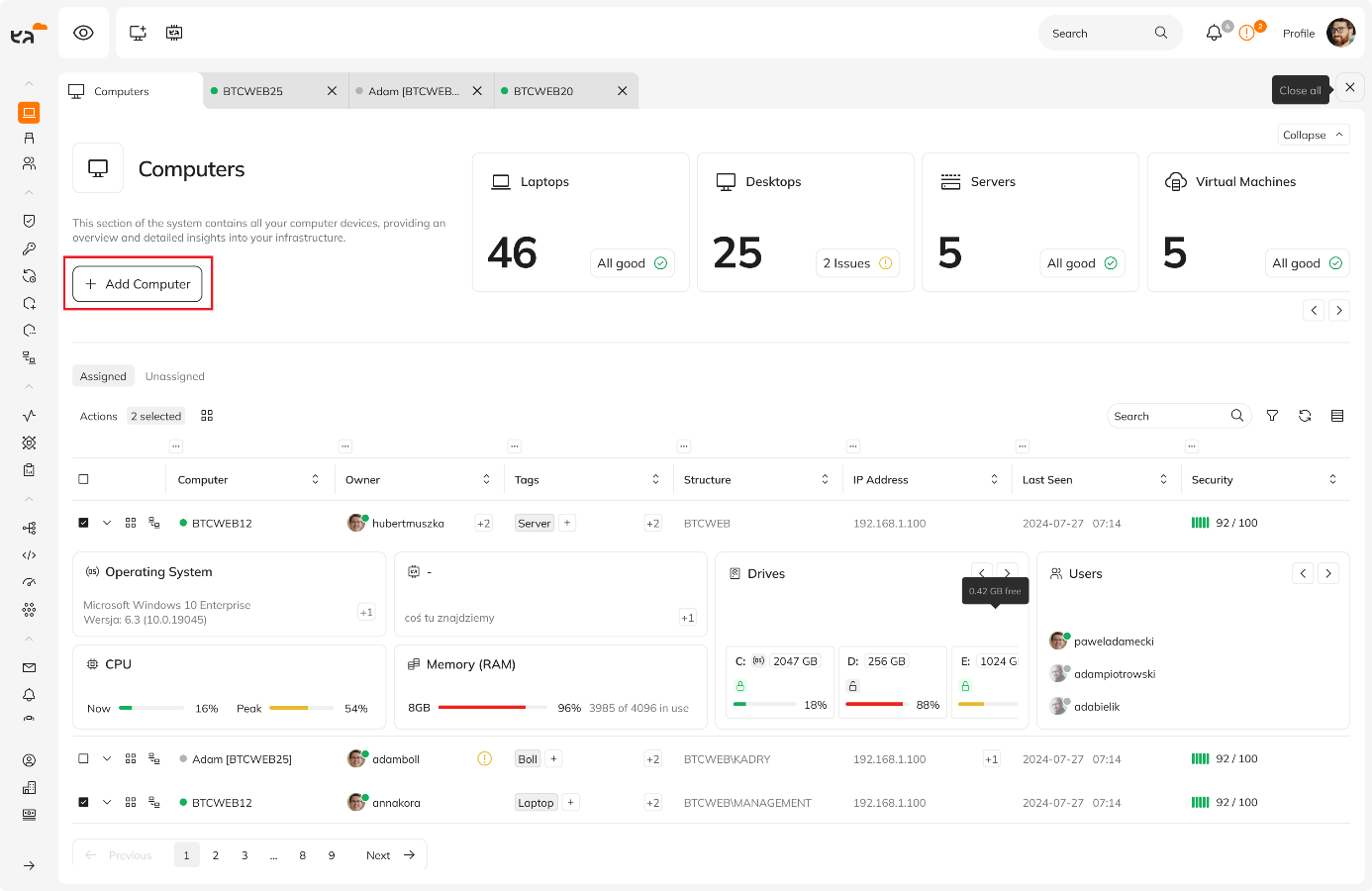
#### Przejdź do: **Funkcje > Infrastruktura IT > Komputery**
{% endstep %}
{% step %}
#### Kliknij **+ Dodaj komputer.**
{% endstep %}
{% endstepper %}
### Instalacja
{% stepper %}
{% step %}
#### Uruchom pobrany instalator na komputerze, który chcesz dodać.
{% endstep %}
{% step %}
#### Jeżeli system Windows wyświetli komunikat Kontroli konta użytkownika, zezwól na wprowadzenie zmian.
{% endstep %}
{% step %}
#### Poczekaj na zakończenie instalacji.
{% endstep %}
{% endstepper %}
{% hint style="info" %}
Po poprawnym zainstalowaniu usługi eAgent komputer automatycznie nawiąże połączenie z eAuditor Cloud i rozpocznie przesyłanie danych.
{% endhint %}
### Sprawdzenie instalacji
Wróć do widoku **Komputery** i sprawdź, czy nowe urządzenie pojawiło się w tabeli.
> Pojawienie się komputera i uzupełnienie wszystkich informacji może wymagać krótkiego oczekiwania. Dane są przesyłane stopniowo po pierwszym uruchomieniu eAgenta.
Szczegółowe informacje o instalacji, opcjonalnych poświadczeniach i rozwiązywaniu problemów znajdziesz na stronie [**Dodawanie komputera i instalacja agenta**](/funkcje/infrastruktura-it/komputery/dodawanie-komputera.md).
---
# Agent Instructions
This documentation is published with GitBook. GitBook is the documentation platform designed so that both humans and AI agents can read, navigate, and reason over technical content effectively. Learn more at gitbook.com.
## Querying This Documentation
If you need additional information that is not directly available in this page, you can query the documentation by asking a question.
Perform an HTTP GET request on the following URL with the `ask` and `goal` query parameters:
```
GET https://eaclouddoc.eauditor.eu/rozpoczecie-pracy/quickstart/dodawanie-pierwszego-komputera.md?ask=&goal=
```
`ask` is the immediate question: it should be specific, self-contained, and written in natural language.
`goal` is what the user is ultimately trying to achieve, the reason they need the answer. Sharing it helps GitBook give you a better, more relevant answer. A goal is most helpful when it describes the outcome the user wants rather than restating the question. For example, with `ask=how do I create an API token`, a goal like `automate deployments from our CI pipeline` lets GitBook tailor the answer to that use case.
The response will contain a direct answer to the question and relevant excerpts and sources from the documentation.
Use this mechanism when the answer is not explicitly present in the current page, you need clarification or additional context, or you want to retrieve related documentation sections.