> For the complete documentation index, see [llms.txt](https://eaclouddoc.eauditor.eu/llms.txt). Markdown versions of documentation pages are available by appending `.md` to page URLs; this page is available as [Markdown](https://eaclouddoc.eauditor.eu/funkcje/zarzadzanie-kontem/profil-uzytkownika.md).
# Profil użytkownika
Zarządzanie informacjami o koncie użytkownika i ustawieniami konta.
## Profil użytkownika
Profil użytkownika dostępny jest z poziomu głównego panelu systemu eAuditor cloud® w sekcji Zarządzanie Kontem. Konto stanowi dedykowaną instancję danych, przypisaną wyłącznie do Użytkownika, który założył konto w systemie.
### **Dane profilu**
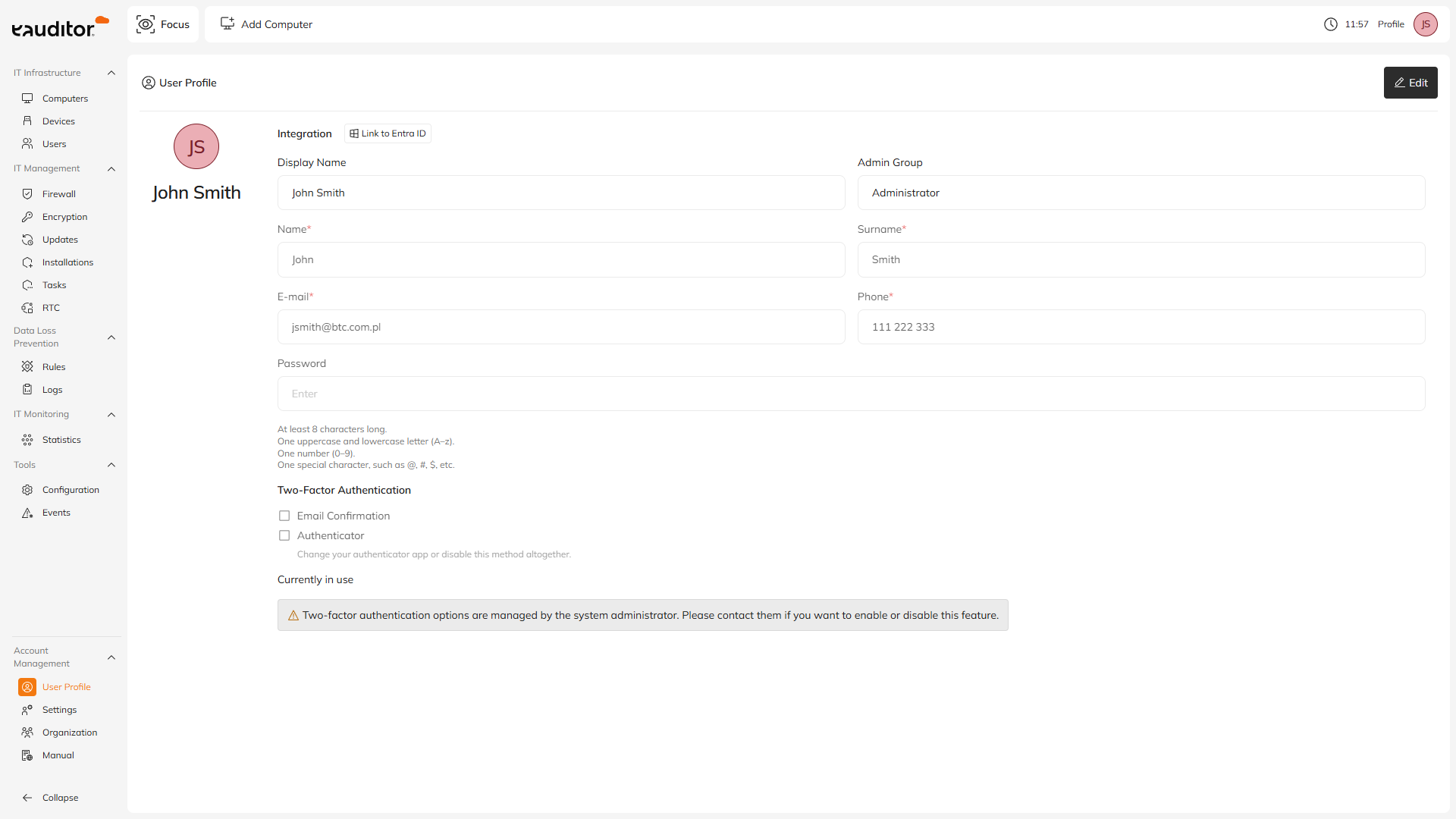
Aby edytować dane profilu, wybierz opcję **Edytuj** w prawym górnym rogu widoku.
* Nazwa wyświetlana nie podlega edycji. Jest generowana automatycznie na podstawie imienia i nazwiska wprowadzonych w profilu.
* Kolor ikonki użytkownika również generowany jest automatycznie i nie można go zmienić.
* Pola: **imię, nazwisko, adres e-mail** oraz **numer telefonu** są wymagane. Bez ich uzupełnienia zapisanie zmian nie będzie możliwe.
* Pole **Grupa administratorów** nie jest edytowalne. Jest to informacja wynikająca z przypisania do grupy uprawnień, konfigurowanej w zakładce: *Zarządzanie kontem - Organizacja - Administratorzy.*
#### **Hasło**
Z poziomu profilu użytkownika możliwa jest zmiana hasła dla danego konta. Obowiązująca polityka haseł:
* co najmniej 8 znaków,
* minimum jedna wielka i jedna mała litera (A-z),
* minimum jedna cyfra (0-9),
* minimum jeden znak specjalny, np. @, #, $.
#### **Uwierzytelnianie**
Jeżeli użytkownik należy do grupy administratorów, z poziomu profilu może ustawić formę uwierzytelniania:
* potwierdzenie adresu e-mail,
* aplikację uwierzytelniającą (np. Google Authenticator lub Microsoft Authenticator).
{% hint style="info" %}
Dla kont z mniejszym zakresem uprawnień zmiana metod uwierzytelniania możliwa jest wyłącznie z poziomu: Zarządzanie kontem - Organizacja - Administratorzy i wymaga użycia konta z uprawnieniami administratora.
{% endhint %}
---
# Agent Instructions
This documentation is published with GitBook. GitBook is the documentation platform designed so that both humans and AI agents can read, navigate, and reason over technical content effectively. Learn more at gitbook.com.
## Querying This Documentation
If you need additional information that is not directly available in this page, you can query the documentation dynamically by asking a question.
Perform an HTTP GET request on the current page URL with the `ask` query parameter, and the optional `goal` query parameter:
```
GET https://eaclouddoc.eauditor.eu/funkcje/zarzadzanie-kontem/profil-uzytkownika.md?ask=&goal=
```
`ask` is the immediate question: it should be specific, self-contained, and written in natural language.
`goal` is optional and describes the broader end goal you are ultimately trying to accomplish on behalf of the user. GitBook uses it to tailor the answer towards what is most useful for that goal.
The response will contain a direct answer to the question and relevant excerpts and sources from the documentation.
Use this mechanism when the answer is not explicitly present in the current page, you need clarification or additional context, or you want to retrieve related documentation sections.