
Configuration of the encryption method and BitLocker protection.
Configuration of the encryption method and BitLocker protection.


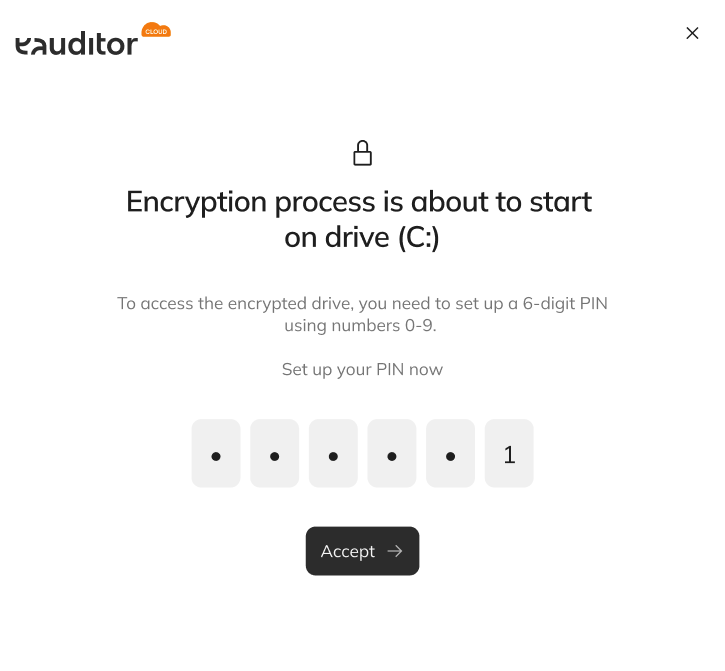 {% endstep %}
{% endstepper %}
### Encryption method
By default, the system selects the strongest method supported by the computer.
In manual settings, you can specify one or more methods:
* **XTS-AES-256** - requires Windows 10 or later,
* **XTS-AES-128** - requires Windows 10 or later,
* **AES-256**,
* **AES-128**.
If you select multiple methods, BitLocker will apply the strongest method supported by the computer.
### Protection method
By default, the system uses protection **TPM without a PIN**, if the computer supports it.
The following are available in manual settings:
| Method | Action |
| ---------- | -------------------------------------------- |
| TPM + PIN | Requires TPM and the user to enter a PIN. |
| TPM | Uses the TPM without additional user action. |
| Passphrase | Requires the user to enter a password. |
If you select multiple protection methods, BitLocker will apply the strongest method supported by the computer.
{% hint style="warning" %}
Selecting TPM protection with a PIN or password requires user action on the computer. The user cannot skip or close this step.
{% endhint %}
### Partition decryption
{% stepper %}
{% step %}
Go to **IT Management > Encryption**.
{% endstep %}
{% step %}
Locate the computer and the encrypted partition.
{% endstep %}
{% step %}
Click **Decrypt**.
{% endstep %}
{% step %}
Confirm that you want to start the operation.
{% endstep %}
{% endstepper %}
The decryption process cannot be canceled after it has started. If the computer is turned off or loses power, BitLocker will resume the process after the device is restarted.
### Temporarily disable BitLocker protection
Options **Disable** and **Enable** apply to BitLocker protection, not to disk encryption itself.
Disabling protection:
* does not decrypt the data,
* temporarily suspends BitLocker protection,
* may be useful during service work or device configuration changes.
To secure the partition again, use the option **Enable**.
{% hint style="info" %}
If you want to permanently remove encryption from the partition, use the option **Decrypt**, not **Disable**.
{% endhint %}
### FAQ
{% endstep %}
{% endstepper %}
### Encryption method
By default, the system selects the strongest method supported by the computer.
In manual settings, you can specify one or more methods:
* **XTS-AES-256** - requires Windows 10 or later,
* **XTS-AES-128** - requires Windows 10 or later,
* **AES-256**,
* **AES-128**.
If you select multiple methods, BitLocker will apply the strongest method supported by the computer.
### Protection method
By default, the system uses protection **TPM without a PIN**, if the computer supports it.
The following are available in manual settings:
| Method | Action |
| ---------- | -------------------------------------------- |
| TPM + PIN | Requires TPM and the user to enter a PIN. |
| TPM | Uses the TPM without additional user action. |
| Passphrase | Requires the user to enter a password. |
If you select multiple protection methods, BitLocker will apply the strongest method supported by the computer.
{% hint style="warning" %}
Selecting TPM protection with a PIN or password requires user action on the computer. The user cannot skip or close this step.
{% endhint %}
### Partition decryption
{% stepper %}
{% step %}
Go to **IT Management > Encryption**.
{% endstep %}
{% step %}
Locate the computer and the encrypted partition.
{% endstep %}
{% step %}
Click **Decrypt**.
{% endstep %}
{% step %}
Confirm that you want to start the operation.
{% endstep %}
{% endstepper %}
The decryption process cannot be canceled after it has started. If the computer is turned off or loses power, BitLocker will resume the process after the device is restarted.
### Temporarily disable BitLocker protection
Options **Disable** and **Enable** apply to BitLocker protection, not to disk encryption itself.
Disabling protection:
* does not decrypt the data,
* temporarily suspends BitLocker protection,
* may be useful during service work or device configuration changes.
To secure the partition again, use the option **Enable**.
{% hint style="info" %}
If you want to permanently remove encryption from the partition, use the option **Decrypt**, not **Disable**.
{% endhint %}
### FAQ