> For the complete documentation index, see [llms.txt](https://eaclouddoc.eauditor.eu/llms.txt). Markdown versions of documentation pages are available by appending `.md` to page URLs; this page is available as [Markdown](https://eaclouddoc.eauditor.eu/eacloud-docs-en/features/data-loss-prevention-1/dlp-policies-and-rules/notifications.md).
# Notifications
## Notifications in DLP rules
### Introduction
**Notifications** is an optional but important element of data protection rules, allowing administrators and end users to be effectively informed about security-related events. Adding notifications increases transparency of rule operations and enables rapid response to potential policy violations.
Notifications are not required, but their configuration is the next step after defining actions. If the user does not enable notifications, the system still generates logs in the **Logs**tab regardless of configured actions and notifications. Notifications execute concurrently with actions, ensuring full synchronization of operations and messages.
If the administrator wants to configure only a notification without additional actions, simply uncheck "**...perform these actions...**" in the [previous step](/eacloud-docs-en/features/data-loss-prevention-1/start/actions.md) and proceed to configure notifications.
[How to configure a DLP policy or rule?](/eacloud-docs-en/features/data-loss-prevention-1/start/policies.md)
### Available notification options
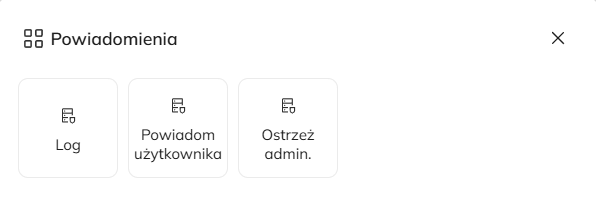
1. **Log in the system:**
* Display the notification in the system, in the **Logs** tab of the web console.
2. **Admin alert (Email notification):**
* Send an e-mail message to the specified address or addresses.
3. **Notify the end user:**
* Display a notification window on the user's workstation in the bottom right corner.
## Notification configuration
### Log
* **Alert content:**
* Ability to enter any text.
* Optional use of dynamic parameters (e.g., event date, computer name).
The list of available parameters is specific to each trigger and is located under [Parameters for notifications](#parametry-do-powiadomien).
### Admin alert (Email notification)
* **Email addresses:**
* Enter one or multiple email addresses by clicking "+".
* Remove addresses using the trash icon.
* **Optional settings:**
* **Inform the device administrator:** Send an email to the person assigned as the administrator in the device details card.
* **Notify the device user:** Send an email to the user assigned to the device in the system.
* **Email message content:**
* Editable subject and body of the email.
* Ability to use an advanced text editor with support for dynamic parameters (e.g., event date, file name).
The list of available parameters is specific to each trigger and is located under [Parameters for notifications](#parametry-do-powiadomien).
### Notify end user
* **Notification in the bottom right corner of the screen for the end user:**
* Less intrusive informational window.
* Content is visible after clicking the notification.
* **Alert content:**
* Ability to enter any text.
* Optional use of dynamic parameters (e.g., event date, computer name).
The list of available parameters is specific to each trigger and is located under [Parameters for notifications](#parametry-do-powiadomien).
***
### Parameters for notifications
File operations
**`%DateTime%`** Date and time of the event\
**`%ComputerName%`** Computer name\
**`%UserName%`** Name of the logged-in user\
**`%ProcessName%`** Process name\
**`%ProcessPath%`** Path to the process directory\
**`%FileName%`** File name\
**`%FilePath%`** Path to the file directory\
**`%OldFileName%`** Previous file name\
**`%OldPath%`** Previous path to the file directory\
**`%FileSize%`** File size (in bytes)\
**`%Operation%`** Performed operation\
**`%DriveType%`** Type of storage media
Screenshot
**`%DateTime%`** Date and time of the event\
**`%ComputerName%`** Computer name\
**`%UserName%`** Name of the logged-in user
Copying
**`%DateTime%`** Date and time of the event\
**`%ComputerName%`** Computer name\
**`%UserName%`** Name of the logged-in user\
**`%ProcessName%`** Name of the process in which the copy operation occurred\
**`%ProcessPath%`** Path of the process directory\
**`%Format%`** Format of the read data (e.g., text, image, file)\
**`%Size%`** Size of data (in bytes)\
**`%Title%`** Title of the active window at the time of copying
Exceeded working hours
**`%DateTime%`** Date and time of the event\
**`%ComputerName%`** Name of the computer where the violation was detected\
**`%UserName%`** Name of the logged-in user
Connecting USB storage
**`%DateTime%`** Date and time of the event\
**`%ComputerName%`** Computer name\
**`%UserName%`** Name of the logged-in user\
**`%IDPENDRIVE%`** Pendrive identifier (e.g., device serial number)\
**`%FileSystem%`** File system (e.g., NTFS, FAT32)\
**`%Encryption%`** Device encryption status
Device connection
**`%DateTime%`** Date and time of the event\
**`%ComputerName%`** Computer name\
**`%UserName%`** Name of the logged-in user\
**`%DeviceName%`** Name of the connected device\
**`%DeviceStatus%`** Device status (e.g., enabled, disabled)\
**`%ActionStatus%`** Status of action execution (e.g., success or error of enabling/disabling operation)
Launched processes/Applications
**`%DateTime%`** Date and time of the event\
**`%ComputerName%`** Computer name\
**`%UserName%`** Name of the logged-in user\
**`%ProcessName%`** Name of the process related to the event\
**`%ProcessPath%`** Path of the process directory\
**`%ParentProcessName%`** Name of the parent process that started or terminated the given process\
**`%ParentProcessPath%`** Path of the parent process directory\
**`%Operation%`** Performed operation (e.g., "Start" or "Terminate")
Browsed web pages
**`%DateTime%`** Date and time of the event\
**`%ComputerName%`** Computer name\
**`%UserName%`** Name of the logged-in user\
**`%ProcessName%`** Name of the process in which the page was visited\
**`%ProcessPath%`** Path of the process directory\
**`%http%`** Address of the visited web page\
**`%c%`** Category of the visited web page
File upload
**`%DateTime%`** Date and time of the event\
**`%ComputerName%`** Computer name\
**`%UserName%`** Name of the logged-in user\
**`%ProcessName%`** Process name (applies to cloud applications and "Other")\
**`%FileName%`** Name of the uploaded file\
**`%FilePath%`** Path of the directory from which the file is being uploaded
Connecting to a network
**`%DateTime%`** Date and time of the event\
**`%ComputerName%`** Computer name\
**`%UserName%`** Name of the logged-in user\
**`%SSID%`** SSID (network name)\
**`%BSSID%`** BSSID (MAC address of the access point)\
**`%Auth%`** Authentication algorithm (e.g., WPA2-PSK)\
**`%Cipher%`** Encryption algorithm (e.g., AES)\
**`%Channel%`** Channel on which the network operates\
**`%Quality%`** Signal quality expressed as a percentage \[%]
Printing
**`{p:date}`** Date of the event occurrence\
**`{p:user}`** User\
**`{p:pagelimit}`** Page limit\
**`{p:perhours}`** Within \[hours]\
**`{p:pagecount}`** Number of pages printed
Network transfer
**`{p:date}`** Date of the event occurrence\
**`{p:hostname}`** Computer name\
**`{p:ip}`** Computer IP address\
**`{p:user}`** Name of the logged-in user\
**`{p:periodofminutes}`** Monitoring period (in minutes)\
**`{p:filecount}`** Number of copied files
## Summary
1. **Conditions for sending notifications:**
* Notifications are triggered according to the rules of the configured rule, i.e., after the occurrence of the event defined in the trigger.
2. **Practical application:**
* Notifications assist in rapid detection of incidents and their reporting.
* Alerts for end users can be used as an educational tool to raise employee awareness of security policies.
A detailed description of parameters and usage examples can be found in the section [**Case Study**](/eacloud-docs-en/features/data-loss-prevention-1/case-study-dlp.md)**.**
---
# Agent Instructions
This documentation is published with GitBook. GitBook is the documentation platform designed so that both humans and AI agents can read, navigate, and reason over technical content effectively. Learn more at gitbook.com.
## Querying This Documentation
If you need additional information that is not directly available in this page, you can query the documentation by asking a question.
Perform an HTTP GET request on the following URL with the `ask` and `goal` query parameters:
```
GET https://eaclouddoc.eauditor.eu/eacloud-docs-en/features/data-loss-prevention-1/dlp-policies-and-rules/notifications.md?ask=&goal=
```
`ask` is the immediate question: it should be specific, self-contained, and written in natural language.
`goal` is what the user is ultimately trying to achieve, the reason they need the answer. Sharing it helps GitBook give you a better, more relevant answer. A goal is most helpful when it describes the outcome the user wants rather than restating the question. For example, with `ask=how do I create an API token`, a goal like `automate deployments from our CI pipeline` lets GitBook tailor the answer to that use case.
The response will contain a direct answer to the question and relevant excerpts and sources from the documentation.
Use this mechanism when the answer is not explicitly present in the current page, you need clarification or additional context, or you want to retrieve related documentation sections.